
Environmental Assessments Section/Support Planners
Frequently Asked Questions
What is an Environmental Assessment (EA)?
An environmental assessment (EA) is conducted for a disabled individual who may be experiencing challenges in maintaining safety and independence at home. The primary purpose of the EA is to identify home safety and accessibility concerns and to recommend appropriate solutions.
In what areas of Maryland does Senior Smart do EAs?
Senior Smart proudly provides EAs for approved Maryland Waiver Program participants throughout the entire state.
At this time, Senior Smart does not conduct private EAs.
What does it cost for Senior Smart to do an EA?
The state sets the EA payment rate for all EA providers. As of July 2025, the rate is $631.63.
Billing is done directly through the Maryland Waiver program. We do not bill Medicaid/Medicare or any insurance.
My client has chosen Senior Smart for an EA? How do I complete a POS for EA services?
Properly completed Plans of Service are important for several reasons. Accurate plans ensure that the state does not reject the plan or make a clarification request, and they also ensure that Senior Smart will be paid properly for services rendered.
The Plan of Service should be completed as shown in the photo below.
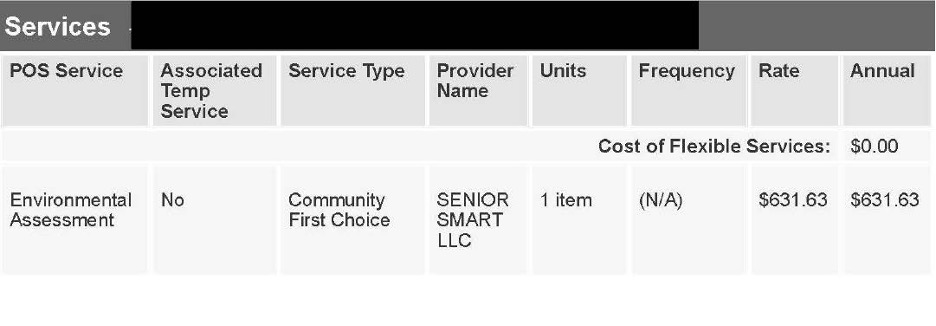
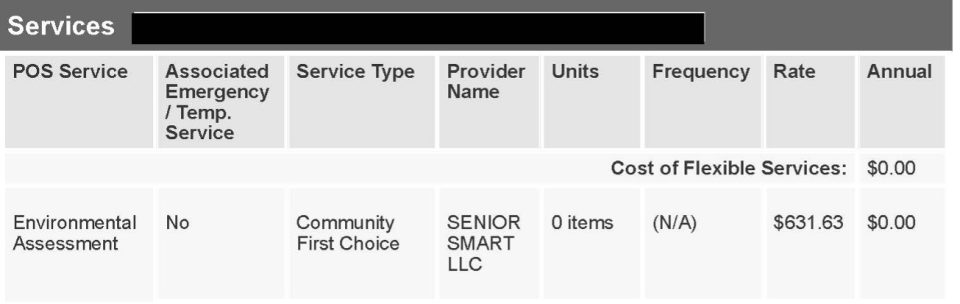
Each column must be completed. The example below shows an incorrectly completed POS. No column can read “0”.
How do I notify Senior Smart of EA services approval?
When a POS is approved, please send a copy of the approved POS to jen@seniorsmart.net. If your agency requires an SNF and/or SNF signature, please include that and note in the email that you need the signed SNF returned.
If the client does not speak English, it is helpful if you include the name and number of the best English-speaking contact we can reach for scheduling the EA.
If any information on the POS is incorrect and/or has changed since the plan was created (address to receive services, phone number), it is important that you alert us to those changes when sending the approval.
How is an EA scheduled?
Once Senior Smart receives notification of POS approval, your client will move into the scheduling queue. Senior Smart will reach out to the client/client’s rep to offer a date and time for the assessment.
Upon POS approval, it is helpful to alert your clients/clients’ reps that we will be calling from 410-259-6622 and the Caller ID will read “Senior Smart”. Many do not answer or listen to voicemails because they do not recognize our number, which further delays initiation of services.
Once the EA has been scheduled, you will receive an email containing all the appointment details. Immediately upon scheduling, the client will receive a text and/or email. Text/email reminders will also be sent the day before the scheduled appointment and the day of the appointment. It is helpful if Support Planners also remind clients the day before a scheduled appointment.
What is included in the EA?
- An interview to gather information about the client’s health, abilities, and daily routines
- A discussion with the client and/or family members about their specific home safety and accessibility concerns
- A walkthrough of the home focusing on the areas where concerns have been identified
- With permission, measurements and photographs will be taken to assist in making appropriate recommendations
- A summary discussion to review identified concerns and explore possible solutions
Please note: Only areas in the home that are relevant to the client’s needs will be assessed. Areas that the client does not use or wish to access will not be assessed.
How should my clients prepare for the EA?
Senior Smart kindly requests that you inform your participants of the following prior to the assessment visit:
- Ideally, the client will be present during the visit. Although we understand this may not always be possible due to other commitments, it is very helpful if Senior Smart can interact with and/or observe the client during the visit.
- If possible, participants should provide a quiet area in the home where Senior Smart can gather and share information effectively during the visit.
- Out of consideration for health and comfort, we request no smoking during the visit.
- Please notify Senior Smart in advance if there are any pest concerns (bedbugs, roaches, other infestations) in the home. This allows us to take proper precautions and plan accordingly.
- Participants should secure or remove any dogs who may be protective or prone to biting. This ensures the safety of both participants’ pets and Senior Smart staff.
What is NOT included in an EA?
Per MDH guidelines, the following may not be included in EA recommendations.
- General home maintenance or repair issues
- Home improvement projects not related to safety or accessibility
- Recommendations involving expansion of the home beyond its current footprint
- Recommendations for more than one accessible entrance (per Maryland Medicaid Waiver guidelines)
- Video monitors or home security systems
- Ongoing updates or revisions to the assessment after it is submitted
- Recommendations for specific contractors to complete the proposed home modifications
What happens after the EA has been completed?
Following the visit, Senior Smart will prepare a detailed report outlining areas of concern and recommended solutions. This report will be submitted to the State, and the Support Planner will be notified when it is available for review. Typically, reports are completed within one week of the visit.
Assessment reports are uploaded to the “Client Attachments” section of the client’s LTSS record. Copies of the report are not sent via email.
Senior Smart is not permitted to provide copies of EA reports to participants or their
representatives. They must be obtained directly from the client’s Support Planner.
After the assessment report has been submitted, the services Senior Smart has agreed to provide are complete. Senior Smart is not involved in the remaining steps of the process.
It is the responsibility of the Support Planner to seek quotes for the recommended modifications from approved contractors
Please note: Senior Smart does not recommend any adaptations providers.
Can changes be made after the EA is complete?
Please remind your clients of the importance of discussing all their home safety and accessibility concerns during the visit. As a reminder, Senior Smart will assess only the areas clients have identified as concerns. If your client chooses not to have certain areas evaluated during the visit, Senior Smart cannot make recommendations for those spaces after the assessment is completed.
Because health conditions and living situations may change over time, Senior Smart will not revise or amend a client’s EA report if more than 60 days have passed since it was completed.
My clients rent their home. Should they still have an EA?
Yes! In most cases, landlords are willing to allow reasonable modifications to meet clients’ home safety and accessibility needs. In addition, the Fair Housing Act (FHA), provides protections related to accessibility needs of tenants. However, it is important that clients understand the specific guidelines and responsibilities involved before proceeding with any modifications to rental properties.
Senior Smart can help your clients make informed decisions regarding accommodations in a rental home. In many cases, effective solutions can be implemented without making permanent changes to the property.
How long is an EA valid?
This is determined solely by the state. In our experience, if there has been a significant change in the client’s medical status or the client has moved, the state will allow a new EA to be completed.
Senior Smart is always happy to do a new EA for a previous client; however, we cannot request or permit that a new EA be done.
Do you only provide services for senior adults?
Senior Smart is pleased to provide services for participants of all ages throughout the entire state.
Want To Know More About Our Other Service?

Personal Emergency Response Systems (PERS)
Our personal emergency response systems and devices keep clients connected to emergency support at the press of a button, at home or on the go. Loved ones rest easier knowing help is always within reach.