
Personal Emergency Response Systems Section/Support Planners
Frequently Asked Questions
What is a Personal Emergency Response System (PERS)?
A Personal Emergency Response System (PERS), also known as a medical alert system, is a device that allows clients to quickly summon help in the event of an emergency. Senior Smart PERS consist of a wearable transmitter, such as a pendant or bracelet. When activated, the transmitter alerts the monitoring center, who then dispatches emergency services or notifies designated contacts.
In what areas of Maryland does Senior Smart provide PERS?
Senior Smart proudly provides PERS for approved Maryland Waiver program participants throughout the entire state.
What types of PERS devices do Senior Smart provide?
Please refer to the PERS section of the website (hyperlink) to see a detailed list of Senior Smart PERS devices.
What does it cost for Senior Smart PERS?
PERS services include two separate costs.
The installation cost is a one-time fee for installation and activation of the device for a new PERS client.
As of July 2025, Senior Smart’s installation cost is $119.
Please note: Clients must have a Senior Smart PERS device. If they have a device from a previous provider, that must be returned and services with that provider must be terminated. Senior Smart cannot provide PERS monitoring using another provider’s equipment.
The monthly monitoring rate for PERS devices is set by the state for all PERS providers.
As of July 2025, the monitoring rate is $49.23 per month for a total of $590.76 annually.
Billing is done directly through the Maryland Waiver program. We do not bill Medicaid/Medicare or any insurance.
My client has chosen Senior Smart for PERS? How do I complete a POS for PERS services?
Properly completed Plans of Service are important for several reasons. Accurate plans ensure that the state does not reject the plan or make a clarification request, and they also ensure that Senior Smart will be paid properly for services rendered.
The example below shows a correctly completed POS for a first-time PERS client.
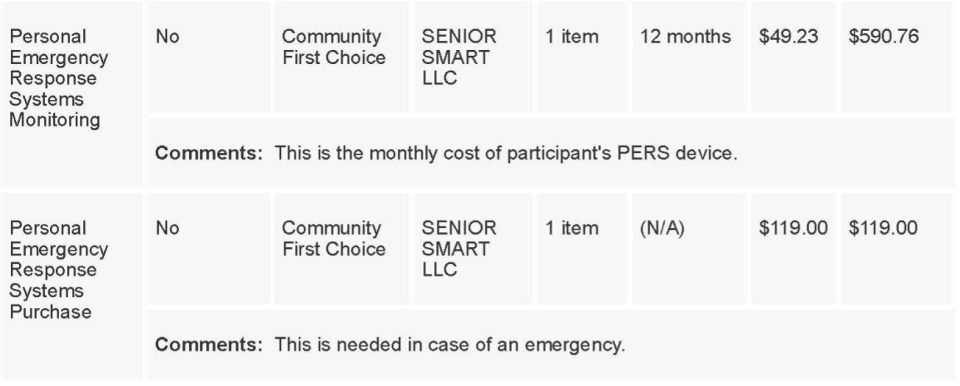
Once Senior Smart has initiated PERS services and billed for the installation cost, the monthly monitoring is the only ongoing cost.
The example below shows a correctly completed annual POS for continued PERS monitoring services.
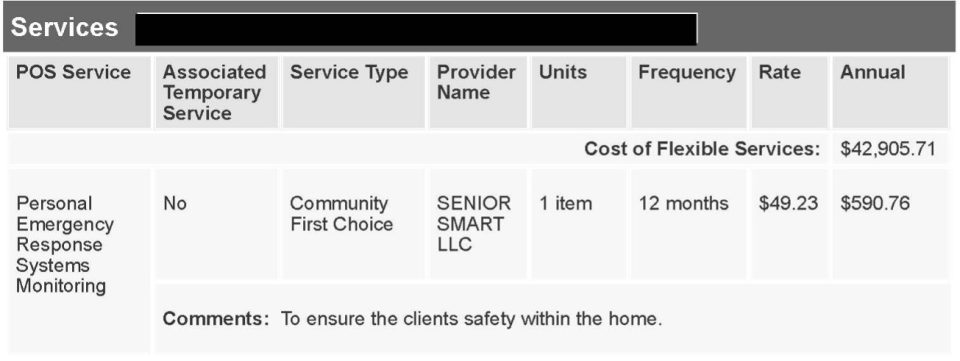
Incorrectly completed plans can potentially delay services for your client and typically affect payment for Senior Smart. It is important that plans are completed properly so that PERS services continue without interruption and Senior Smart receives payment.
The example below shows an incorrectly completed POS for a first-time PERS client.
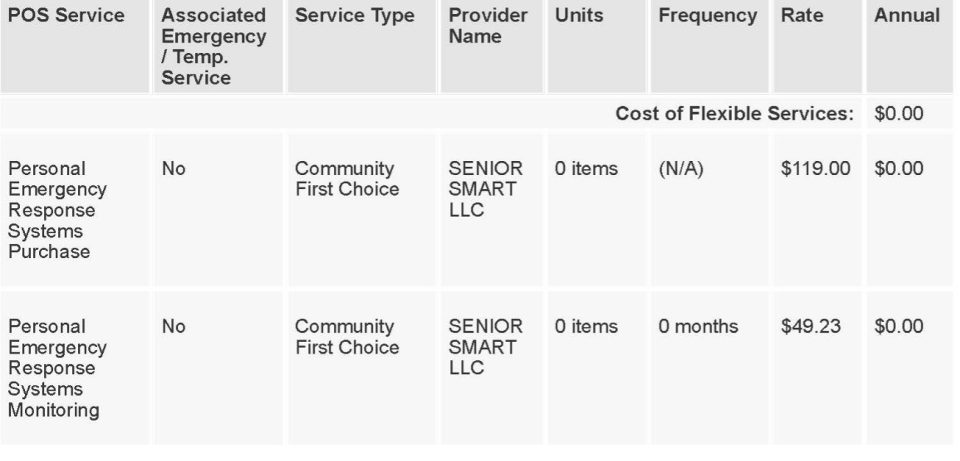
In the above example, the unit column for the PERS purchase must show 1 item so that 119.00 is shown in the Annual column. In the monitoring column, the POS must show 1 unit for 12 months at 49.23 so that 590.76 is shown in the Annual column. These columns cannot show 0.
Senior Smart carefully reviews each plan before signing; however, correct plans ensure that there are no interruptions or delays in the approval process and the client’s services can begin in a timely manner.
How do I notify Senior Smart of PERS services approval?
When a POS is approved, please send a copy of the approved POS to jen@seniorsmart.net. If your agency requires an SNF and/or SNF signature, please include that and note in the email that you need the signed SNF returned.
Although we have limited LTSS access for EA clients, Senior Smart has no LTSS access for PERS clients. For this reason, we require copies of the full (initial and annual) plan of service for each client. The SNF alone is not sufficient to initiate or continue PERS services.
We also use approved plans to ensure that we have the correct address and phone information for the client, both of which are vital for prompt emergency response.
If your PERS client does not speak English, when sending the approved POS, please include the name and number of the best English-speaking contact we can reach for scheduling delivery. Because we have no LTSS access, we have no other way of getting this information.
If the client has no English-speaking contact, please let us know the client’s preferred language. We will attempt to reach the client via our translation service. If we are unable to reach him/her, you will be notified to assist us with reaching the client.
If any information on the POS is incorrect and/or has changed since the plan was created (address to receive services, phone number), it is important that you alert us to those changes when sending the approval.
Will I be notified if my client pressed his or her PERS button?
When a button is pressed in an emergency, Senior Smart receives a PERS Incident Report (PIR) directly from the monitoring center. This report will always be forwarded to the Support Planner we have on file. The password to open the report will be included in the email you receive from us.
Please note: this report is the ONLY information Senior Smart receives about the incident. You must contact the client/client’s rep directly for additional details.
How do I request updates on my clients’ PERS devices?
Senior Smart is happy to provide updates on your clients’ devices. However, because we have many PERS clients, these are provided via email only. Updates are not provided over the phone. If you would like to request an update, please send an email to jen@seniorsmart.net. The email must include the clients’ names and/or MA ID or LTSS ID numbers. If you are requesting updates on more than one client, please include all of them in one email, if possible.
What should I do if my PERS client moves or changes phone numbers?
Accurate contact information is vital for proper EMS response in the event of an emergency. Please notify us immediately if your client moves or gets a new phone number, so we can update all the necessary records.
What should I do if my client loses his/her PERS device?
Senior Smart will replace the PERS device. However, there is a $299 replacement fee that should be added to the client’s POS so that we can be reimbursed for the replacement equipment. This should be placed on the POS as a “PERS equipment purchase” under the Senior Smart provider number, 146804900. Please note in the narrative that the client lost the previous unit, and this cost is for replacement equipment. There is no additional $119 installation fee.
In order to ensure there is no lapse in service, Senior Smart will replace the device immediately and wait until the POS is approved to bill for the replacement cost.
What should I do if my client is temporarily disenrolled/has inactive MA for a time?
If your client experiences a temporary lapse or loss of MA coverage, please let us know immediately. We can place his or her monitoring account on temporary hold for 30-60 days while the client attempts to re-enroll. We do not bill for monitoring while the client’s account is on temporary hold.
Please note: if the monitoring account is closed and/or the PERS equipment has been returned, we will need a new, approved plan showing a new purchase price and monitoring before PERS services can restart. If the account has been closed, we cannot reactivate services based on a prior approved plan even if the client still has Senior Smart equipment. That equipment has been deactivated and will no longer work. We will need to send a new device.
If your client’s PERS monitoring has been placed on temporary hold, please notify us immediately when services are reinstated, so we can remove the temporary hold and monitoring services can resume.
What should I do if my PERS client is deceased or permanently disenrolled?
Please notify Senior Smart immediately with an SNF showing the effective date that the client’s services have been terminated and the name/number of the best person to reach regarding returning the device.
Please notify the client/client’s rep that the PERS unit is rental equipment that must be returned. It should NOT be discarded. If the client is moving or leaving the current residence, please ask him/her to take the unit with them.
Senior Smart will reach out to advise that we will be sending a SASE (self-addressed stamped envelope) so the equipment can be mailed back to us through the USPS at no cost. We appreciate your help in ensuring that our costly equipment is returned.
Do you provide lockboxes for PERS clients?
We can provide lockboxes at no cost for Senior Smart PERS clients only. The lockbox will be mailed directly to the client, and he/she will need to program the lockbox with the chosen code and let Senior Smart know what the code is. The code will be listed in the client’s monitoring account so that EMS personnel have access to it during an emergency.
If the client has another PERS provider and would like a lockbox, please contact us for cost information.
Want To Know More About Our Other Service?

Environmental Assessments
Our Environmental Assessments help uncover safety hazards in the home and recommend modifications to create a safer, more accessible environment. Support Planners rely on us to ensure their clients receive practical, effective recommendations tailored to their needs.